четверг, 19 июня 2014 г.

EtherChannel vs LACP vs PAgP

В конце есть статьи полезные ссылки.
Оригинал тут - http://advanxer.com/blog/2013/08/etherchannel-vs-lacp-vs-pagp/
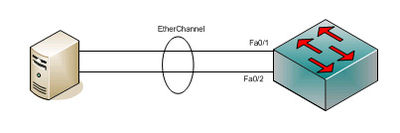
Etherchannel
What is EtherChannel?
EtherChannel links formed when two or more links budled together for the purposes of aggregating available bandwidth and providing a measure of physical redundancy. Without EtherChannel, only one link will be available while the rest of the links will be disabled by STP, to prevent loop.
p/s# Etherchannel is a term normally used by Cisco, other vendors might calling this with a different term such as port trunking, trunking (do not confuse with cisco’s trunk port definition), bonding, teaming, aggregation etc

понедельник, 9 июня 2014 г.

Calalyst 4500 serial numbers

Чтобы получить подробную инфу по платам и их серийникам в 4500 и 6500 есть команда

Cat4507RE-Core-2#show idprom ?
  all           show all non-interface IDPROMs
  chassis       show IDPROM for chassis
  clock-module  show IDPROM for backplane clock module
  fan-tray      show IDPROM for system fan tray
  interface     show contents of gbic connected to this interface
  module        show IDPROM for module
  mux-buffer    show IDPROM for mux buffers
  power-supply  show IDPROM for power supply
  supervisor    show IDPROM for supervisor

show IDPROMs for chassis and supervisor

четверг, 22 мая 2014 г.

Ошибка PLATFORM_UCAST-4-PREFIX Catalsyt 3750

show platform tcam utilization
sh platform ip unicast counts
sh platform ip unicast failed route 

Тут подробно - http://www.anticisco.ru/forum/viewtopic.php?f=2&t=4836&view=previous

Тут же мимо ходом. Нашел процесс, который съедает весь цпу. HL3U bkgrd process. По нему нашел вот что - https://supportforums.cisco.com/discussion/11788206/hl3u-bkgrd-proce-high-cpu-usage-3750x-switch:
Hl3u bkgrd process - manages quite a few background tasks like
- Hardware Arp throttling house keeping tasks
- Retry adjs/Fib in case of an out of hardware resource condition
- proxy arp house keeping functions
- ICMP redirect processing
- TTL ICMP error generation in some conditions
- handling correct route forwarding in an output acl full condition
2) Check for ARP statictics under sh ip traffic.I dont have any access to the config of your device hence assuming.
could you check if "no ip arp incomplete enable" command dose the trick for you?
3) Also consider the bug mentioned by Alex thats a clean hit.

воскресенье, 11 мая 2014 г.

PPTP. network behind client.

Две площадки объединены туннелем. На одной стоит PPTP сервер на линуксе, на другой микротик, который цепляется к первому клиентским туннелем. За микротиком сетка 192.168.3.0/24. В линуксе нужно прописать маршрут. Делаем это динамически при подключении определенного пира. IP-адрес для пира постоянный. Итак, в файл /etc/ppp/ip-up дописываем:

#!/bin/sh
#
# This script is run by the pppd after the link is established.
# It uses run-parts to run scripts in /etc/ppp/ip-up.d, so to add routes,
# set IP address, run the mailq etc. you should create script(s) there.
#
# Be aware that other packages may include /etc/ppp/ip-up.d scripts (named
# after that package), so choose local script names with that in mind.
#
# This script is called with the following arguments:
#    Arg  Name                          Example
#    $1   Interface name                ppp0
#    $2   The tty                       ttyS1
#    $3   The link speed                38400
#    $4   Local IP number               12.34.56.78
#    $5   Peer  IP number               12.34.56.99
#    $6   Optional ``ipparam'' value    foo

# The  environment is cleared before executing this script
# so the path must be reset
PATH=/usr/local/sbin:/usr/sbin:/sbin:/usr/local/bin:/usr/bin:/bin
export PATH

# These variables are for the use of the scripts run by run-parts
PPP_IFACE="$1"
PPP_TTY="$2"
PPP_SPEED="$3"
PPP_LOCAL="$4"
PPP_REMOTE="$5"
PPP_IPPARAM="$6"
export PPP_IFACE PPP_TTY PPP_SPEED PPP_LOCAL PPP_REMOTE PPP_IPPARAM

# as an additional convenience, $PPP_TTYNAME is set to the tty name,
# stripped of /dev/ (if present) for easier matching.
PPP_TTYNAME=`/usr/bin/basename "$2"`
export PPP_TTYNAME

case "$5" in
        172.26.100.42)
                /sbin/route add 192.168.3.161/32 gw 172.26.100.42
                ;;
        *)
esac

# If /var/log/ppp-ipupdown.log exists use it for logging.
if [ -e /var/log/ppp-ipupdown.log ]; then
  exec > /var/log/ppp-ipupdown.log 2>&1
  echo $0 $*
  echo
fi

# This script can be used to override the .d files supplied by other packages.
if [ -x /etc/ppp/ip-up.local ]; then
  exec /etc/ppp/ip-up.local "$*"
fi

run-parts /etc/ppp/ip-up.d \
  --arg="$1" --arg="$2" --arg="$3" --arg="$4" --arg="$5" --arg="$6"

# if pon was called with the "quick" argument, stop pppd
if [ -e /var/run/ppp-quick ]; then
  rm /var/run/ppp-quick
  wait
  kill $PPPD_PID
fi

Тут есть описание переменных, можно сделать это в отдельном файле ip-up.local. Да, чтобы одинаковые маршруты не плодились не забудьте прописать аналогичное в ip-down (route del).

четверг, 20 марта 2014 г.

Wing Motorola dhcp server on rfs 6000

Некоторое время не мог понять, почему же dhcp сервер в контроллере rfs6000 пишет в логах "Jan 02 15:54:39 2012: %DAEMON-3-ERR: dhcpd: DHCPDISCOVER from b4:c7:99:df:a8:e0 via vlan1: network vlan1: no free leases" при отсутствии вообще назначений. И тут до меня дошло :)

Смотрим на конфиг:

!
dhcp-server-policy dhcp-policy-global
 dhcp-pool WLAN1
  network 192.168.18.0/24
  excluded-address range 192.168.18.1 192.168.18.10
  default-router 192.168.18.1
  dns-server 8.8.8.8
 dhcp-pool AP-POOL
  network 192.168.19.0/24
  excluded-address range 192.168.19.1 192.168.19.10
  default-router 192.168.19.1
  dns-server 8.8.8.8
!

среда, 12 марта 2014 г.

Cisco IOS destination NAT from inside/outside

Это привычная всем трансляция "снаружи" или как её ещё называют "проброс портов" с внешнего адреса на внутренний хост. Указываем внешний адрес маршрутизатора 10.255.253.2 в браузере, попадаем на 80 порт хоста 10.10.1.213.
!
ip nat inside source static tcp 10.10.1.213 80 interface GigabitEthernet0/0.130 80 vrf WIFI-HEAD
!
А ниже трансляция с другой стороны. Допустим, у вас в сети есть какая-то DMZ, начинающаяся на периметре на ASA. На ней с внешнего интерфейса с адресом 86.115.124.10 транслируется порт 80 на хост 10.10.1.213. Для локальных юзеров сайт не доступен по внешнему этому адресу, а они хотят именно по нему ходить. Ниже строчка, транслирующая dst address с 86.115.124.10 на 10.10.1.213 и обратно т.е. юзеры видят пакеты, которые приходят им в ответ с адреса .10, хотя, на самом деле, они идут с адреса .213.
!
ip nat outside source static tcp 10.10.1.213 80 86.115.124.10 80 vrf WIFI-HEAD extendable
!
interface Integrated-Service-Engine1/0.11
 encapsulation dot1Q 11
 ip vrf forwarding WIFI-HEAD
 ip address 192.168.11.1 255.255.255.0
 ip helper-address 192.168.244.5
 ip nat inside
 ip virtual-reassembly in
!
interface GigabitEthernet0/0.130
 encapsulation dot1Q 130
 ip vrf forwarding WIFI-HEAD
 ip address 10.255.253.2 255.255.255.0
 ip nat outside
 ip virtual-reassembly in
!

среда, 5 марта 2014 г.

Motorola WING 5.X packet capture

rfs6000-19D086#service pktcap on interface me1 filter host 172.16.0.1
Capturing up to 50 packets. Use Ctrl-C to abort.
1 11:57:47.831655 ICMP: 172.16.240.18 > 172.16.0.1 echo request, id 19442, seq 1, length 108, DF, DSCP 0
2 11:57:47.831935 ICMP: 172.16.0.1 > 172.16.240.18 echo reply, id 19442, seq 1, length 108, DSCP 0
3 11:57:48.832765 ICMP: 172.16.240.18 > 172.16.0.1 echo request, id 19442, seq 2, length 108, DF, DSCP 0
4 11:57:48.832977 ICMP: 172.16.0.1 > 172.16.240.18 echo reply, id 19442, seq 2, length 108, DSCP 0
5 11:57:49.832768 ICMP: 172.16.240.18 > 172.16.0.1 echo request, id 19442, seq 3, length 108, DF, DSCP 0
6 11:57:49.833003 ICMP: 172.16.0.1 > 172.16.240.18 echo reply, id 19442, seq 3, length 108, DSCP 0
7 11:57:50.835786 ICMP: 172.16.240.18 > 172.16.0.1 echo request, id 19442, seq 4, length 108, DF, DSCP 0
8 11:57:50.836046 ICMP: 172.16.0.1 > 172.16.240.18 echo reply, id 19442, seq 4, length 108, D

rfs6000-19D086#service pktcap on interface me1 write ?
  FILE  Files: flash:/path/file
               usb1:/path/file
               nvram:startup-config
  URL   URLs:  tftp://[:port]/path/file
               ftp://:@[:port]/path/file
               sftp://:@[:port]>/path/file

rfs6000-19D086#service pktcap on interface me1 write flash:/moto1.pcap filter host 172.16.0.1
Capturing up to 50 packets. Use Ctrl-C to abort.
50

rfs6000-19D086#copy flash:/moto1.pcap ?
  FILE  File to which to copy
        Files: flash:/path/file
               usb1:/path/file
               nvram:startup-config
               running-config (merges with current configuration)
  URL   URL to which to copy
        URLs:  tftp://[:port]/path/file
               ftp://:@[:port]/path/file
               sftp://:@[:port]>/path/file
       

rfs6000-19D086#copy flash:/moto2.pcap ftp://ftpuser:ftpuser@172.16.42.80/